> ## Documentation Index
> Fetch the complete documentation index at: https://daehan-base.mintlify.site/llms.txt
> Use this file to discover all available pages before exploring further.
# 인증 (Base로 로그인)
> Privy와 Base Account를 사용한 사용자 인증 관리
export const GithubRepoCard = ({title, githubUrl}) => {
return
;
};
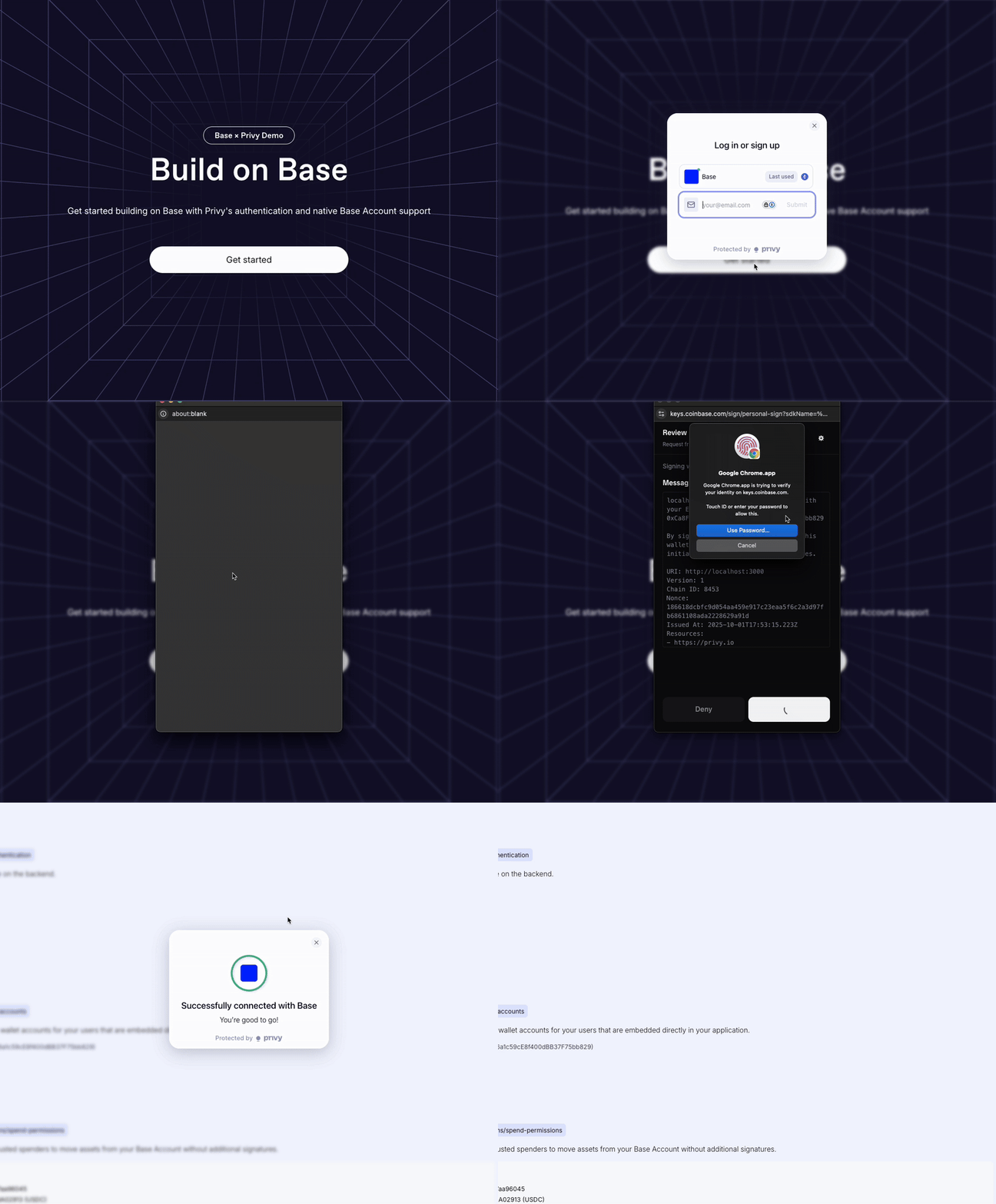
Privy와 Base Account를 사용한 인증 플로우를 처리하는 방법을 알아보세요. Privy 관리 인증과 커스텀 백엔드 검증 모두 포함합니다.
## 개요
Privy는 초기 인증 플로우를 처리하며 사용자 세션과 지갑 연결을 관리합니다. 보안 강화나 커스텀 요구사항을 위해 추가적인 인증 레이어를 구현할 수도 있습니다.
이 가이드의 코드 스니펫은 다음 예제 프로젝트를 기반으로 합니다:
## 인증 플로우
Privy는 사용자가 애플리케이션에 진입하기 전에 기본 인증을 관리합니다:
## 커스텀 인증
추가적인 보안이나 커스텀 인증 요구사항을 위해 Base Account SDK를 사용한 Sign-In with Ethereum (SIWE)으로 백엔드 검증을 구현할 수 있습니다.
### 설정
[설정](/base-account/framework-integrations/privy/setup) 가이드를 따라 Base Account와 함께 Privy를 설정하세요.
### 프런트엔드 컴포넌트 (Base로 로그인)
브랜드 가이드라인을 준수하기 위해 `@base-org/account-ui/react` 패키지의 `SignInWithBaseButton` 컴포넌트를 사용합니다.
```tsx 인증 컴포넌트 (components/sections/authentication.tsx) expandable theme={null}
"use client";
import { useState } from "react";
import { useBaseAccountSdk } from "@privy-io/react-auth";
import { SignInWithBaseButton } from "@base-org/account-ui/react";
export const Authentication = () => {
const { baseAccountSdk } = useBaseAccountSdk();
const [loading, setLoading] = useState(false);
const [verificationResult, setVerificationResult] = useState(null);
const provider = baseAccountSdk?.getProvider();
const handleSignInWithBase = async () => {
if (!provider) return;
try {
setLoading(true);
// 백엔드에서 새로운 nonce 가져오기
const nonceResponse = await fetch("/api/auth/nonce");
const { nonce } = await nonceResponse.json();
// Base Chain으로 전환
await provider.request({
method: "wallet_switchEthereumChain",
params: [{ chainId: "0x2105" }],
});
// SIWE로 연결 및 인증
const response = (await provider.request({
method: "wallet_connect",
params: [{
version: "1",
capabilities: {
signInWithEthereum: {
nonce,
chainId: "0x2105",
},
},
}],
})) as {
accounts: {
address: string;
capabilities: {
signInWithEthereum: { signature: string; message: string };
};
}[];
};
const { address } = response.accounts[0];
const { message, signature } = response.accounts[0].capabilities.signInWithEthereum;
// 백엔드에서 검증
const verifyResponse = await fetch("/api/auth/verify", {
method: "POST",
headers: { "Content-Type": "application/json" },
body: JSON.stringify({ address, message, signature }),
});
const result = await verifyResponse.json();
setVerificationResult(result);
} catch (error) {
console.error("Sign in error:", error);
} finally {
setLoading(false);
}
};
return (
{verificationResult && (
✅ 백엔드 검증 완료! 주소: {verificationResult.address}
)}
);
};
export default Authentication;
```
### 인증 컴포넌트 사용
Base로 로그인 기능을 활성화하기 위해 페이지에 Authentication 컴포넌트를 추가합니다:
```tsx 페이지 구현 (app/page.tsx) theme={null}
import Authentication from "@/components/sections/authentication";
export default function Home() {
return (
Privy와 함께하는 Base Account
);
}
```
```tsx 대안: 보호된 페이지 (app/dashboard/page.tsx) theme={null}
"use client";
import { usePrivy } from "@privy-io/react-auth";
import Authentication from "@/components/sections/authentication";
export default function Dashboard() {
const { authenticated } = usePrivy();
if (!authenticated) {
return (
접근 권한 필요
대시보드에 접근하려면 인증하세요.
);
}
return (
대시보드
인증된 대시보드에 오신 것을 환영합니다!
{/* 보호된 콘텐츠 */}
);
}
```
### 백엔드 구현
**개발 전용**: 이 백엔드 구현은 프로덕션 준비가 되어 있지 않습니다. nonce 관리 시스템은 프로덕션 사용을 위해 적절한 지속성과 보안 강화가 필요합니다.
```ts Nonce 생성 (app/api/auth/nonce/route.ts) theme={null}
import { NextResponse } from 'next/server';
import crypto from 'crypto';
import { nonceStore } from '@/lib/nonce-store';
export async function GET() {
try {
const nonce = crypto.randomBytes(16).toString('hex');
nonceStore.add(nonce);
return NextResponse.json({ nonce });
} catch (error) {
return NextResponse.json(
{ error: '서명 생성 실패' },
{ status: 500 }
);
}
}
```
```ts 서명 검증 (app/api/auth/verify/route.ts) expandable theme={null}
import { NextRequest, NextResponse } from 'next/server';
import { createPublicClient, http } from 'viem';
import { base } from 'viem/chains';
import { nonceStore } from '@/lib/nonce-store';
const client = createPublicClient({
chain: base,
transport: http()
});
export async function POST(request: NextRequest) {
try {
const { address, message, signature } = await request.json();
// SIWE 메시지에서 nonce 추출
const nonce = message.match(/Nonce: (\w+)/)?.[1];
if (!nonce || !nonceStore.consume(nonce)) {
return NextResponse.json(
{ error: '유효하지 않거나 이미 사용된 nonce' },
{ status: 400 }
);
}
// viem을 사용한 서명 검증
const valid = await client.verifyMessage({
address: address as `0x${string}`,
message,
signature: signature as `0x${string}`
});
if (!valid) {
return NextResponse.json(
{ error: '유효하지 않은 서명' },
{ status: 401 }
);
}
return NextResponse.json({
success: true,
address,
timestamp: new Date().toISOString()
});
} catch (error) {
return NextResponse.json(
{ error: '내부 서버 오류' },
{ status: 500 }
);
}
}
```
```ts Nonce 저장소 (lib/nonce-store.ts) expandable theme={null}
// 간단한 인메모리 nonce 저장소
// 프로덕션에서는 Redis 또는 데이터베이스 사용
class NonceStore {
private nonces = new Set();
add(nonce: string): void {
this.nonces.add(nonce);
}
consume(nonce: string): boolean {
return this.nonces.delete(nonce);
}
}
export const nonceStore = new NonceStore();
```
### 프로덕션 고려사항
프로덕션 배포를 위해 다음 백엔드 구현 강화를 권장합니다:
* **영속 저장소**: 인메모리 저장소 대신 Redis 또는 데이터베이스 사용
* **속도 제한**: nonce 생성에 대한 요청 속도 제한 구현
* **세션 관리**: 적절한 JWT 토큰 또는 세션 쿠키 생성
* **Nonce 만료**: 타임스탬프 기반 nonce 만료 추가