> ## Documentation Index
> Fetch the complete documentation index at: https://daehan-base.mintlify.site/llms.txt
> Use this file to discover all available pages before exploring further.

# 설정

> React 애플리케이션에서 Base Account 커넥터로 Wagmi 설정하기

export const GithubRepoCard = ({title, githubUrl}) => {
  return <a href={githubUrl} target="_blank" rel="noopener noreferrer" className="mb-4 flex items-center rounded-lg bg-zinc-900 p-4 text-white transition-all hover:bg-zinc-800">
      <div className="flex w-full items-center gap-3">
        <svg height="24" width="24" className="flex-shrink-0 dark:fill-white" viewBox="0 0 16 16" xmlns="http://www.w3.org/2000/svg">
          <path fill="currentColor" fillRule="evenodd" d="M8 0C3.58 0 0 3.58 0 8c0 3.54 2.29 6.53 5.47 7.59.4.07.55-.17.55-.38 0-.19-.01-.82-.01-1.49-2.01.37-2.53-.49-2.69-.94-.09-.23-.48-.94-.82-1.13-.28-.15-.68-.52-.01-.53.63-.01 1.08.58 1.23.82.72 1.21 1.87.87 2.33.66.07-.52.28-.87.51-1.07-1.78-.2-3.64-.89-3.64-3.95 0-.87.31-1.59.82-2.15-.08-.2-.36-1.02.08-2.12 0 0 .67-.21 2.2.82.64-.18 1.32-.27 2-.27.68 0 1.36.09 2 .27 1.53-1.04 2.2-.82 2.2-.82.44 1.1.16 1.92.08 2.12.51.56.82 1.27.82 2.15 0 3.07-1.87 3.75-3.65 3.95.29.25.54.73.54 1.48 0 1.07-.01 1.93-.01 2.2 0 .21.15.46.55.38A8.013 8.013 0 0016 8c0-4.42-3.58-8-8-8z" />
        </svg>

        <div className="flex min-w-0 flex-grow flex-col">
          <span className="truncate text-base font-medium">{title}</span>
          <span className="truncate text-xs text-zinc-400">{githubUrl}</span>
        </div>

        <svg className="h-5 w-5 flex-shrink-0 text-zinc-400" fill="none" viewBox="0 0 24 24" stroke="currentColor">
          <path strokeLinecap="round" strokeLinejoin="round" strokeWidth={2} d="M9 5l7 7-7 7" />
        </svg>
      </div>
    </a>;
};

친숙한 React 훅으로 Base Account SDK 기능을 사용하기 위해 Wagmi와 Base Account를 설정하는 방법을 알아보세요.

## 개요

[Wagmi](https://wagmi.sh/)는 EVM(Ethereum Virtual Machine) 호환 네트워크를 위한 React 훅 모음으로, 지갑, 컨트랙트, 트랜잭션, 서명 작업을 쉽게 처리할 수 있게 해줍니다. Base Account는 Wagmi와 완벽하게 통합되어 친숙한 훅을 모두 사용할 수 있습니다.

[Base Account Wagmi 템플릿](https://github.com/base/demos/tree/master/base-account/base-account-wagmi-template)으로 바로 시작할 수 있습니다.

<GithubRepoCard title="Base Account Wagmi 템플릿" githubUrl="https://github.com/base/demos/tree/master/base-account/base-account-wagmi-template" />

## 설치

### 옵션 1: 새 Wagmi 프로젝트

<Steps>
  <Step title="새 Wagmi 프로젝트 생성">
    명령줄로 새 wagmi 프로젝트를 생성합니다:

    <CodeGroup>
      ```bash npm theme={null}
      npm create wagmi@latest
      ```

      ```bash pnpm theme={null}
      pnpm create wagmi
      ```

      ```bash yarn theme={null}
      yarn create wagmi
      ```

      ```bash bun theme={null}
      bun create wagmi
      ```
    </CodeGroup>
  </Step>

  <Step title="Base Account SDK 버전 오버라이드">
    Wagmi 내에서 최신 버전의 Base Account SDK에 접근하려면 다음 명령어로 오버라이드합니다:

    <CodeGroup>
      ```bash npm theme={null}
      npm pkg set overrides.@base-org/account="latest"
      # 또는 package.json에 수동으로 추가:
      # "overrides": { "@base-org/account": "latest" }
      ```

      ```bash pnpm theme={null}
      # pnpm은 package.json에 수동으로 추가해야 합니다:
      # "pnpm": { "overrides": { "@base-org/account": "latest" } }
      ```

      ```bash yarn theme={null}
      # yarn은 resolutions를 사용합니다 - package.json에 수동으로 추가:
      # "resolutions": { "@base-org/account": "latest" }
      ```

      ```bash bun theme={null}
      # bun은 overrides를 지원합니다 - package.json에 수동으로 추가:
      # "overrides": { "@base-org/account": "latest" }
      ```
    </CodeGroup>

    특정 버전을 사용하려면 오버라이드에 버전을 추가하세요:

    <CodeGroup>
      ```bash npm theme={null}
      npm pkg set overrides.@base-org/account="2.2.0"
      # 또는 package.json에 수동으로 추가:
      # "overrides": { "@base-org/account": "2.2.0" }
      ```

      ```bash pnpm theme={null}
      # pnpm은 package.json에 수동으로 추가해야 합니다:
      # "pnpm": { "overrides": { "@base-org/account": "2.2.0" } }
      ```

      ```bash yarn theme={null}
      # yarn은 resolutions를 사용합니다 - package.json에 수동으로 추가:
      # "resolutions": { "@base-org/account": "2.2.0" }
      ```

      ```bash bun theme={null}
      # bun은 overrides를 지원합니다 - package.json에 수동으로 추가:
      # "overrides": { "@base-org/account": "2.2.0" }
      ```
    </CodeGroup>
  </Step>

  <Step title="의존성 설치">
    원하는 패키지 매니저로 의존성을 설치합니다:

    <CodeGroup>
      ```bash npm theme={null}
      npm install
      ```

      ```bash pnpm theme={null}
      pnpm install
      ```

      ```bash yarn theme={null}
      yarn install
      ```

      ```bash bun theme={null}
      bun install
      ```
    </CodeGroup>
  </Step>
</Steps>

<Tip>
  **처음 설치가 아닌 경우**

  오버라이드가 적용되도록 `node_modules`와 `package-lock.json`을 삭제하고 새로 설치해야 합니다.
</Tip>

### 옵션 2: 기존 프로젝트

<Steps>
  <Step title="Base Account SDK 버전 오버라이드">
    Wagmi 내에서 최신 버전의 Base Account SDK에 접근하려면 다음 명령어로 오버라이드합니다:

    <CodeGroup>
      ```bash npm theme={null}
      npm pkg set overrides.@base-org/account="latest"
      # 또는 package.json에 수동으로 추가:
      # "overrides": { "@base-org/account": "latest" }
      ```

      ```bash pnpm theme={null}
      # pnpm은 package.json에 수동으로 추가해야 합니다:
      # "pnpm": { "overrides": { "@base-org/account": "latest" } }
      ```

      ```bash yarn theme={null}
      # yarn은 resolutions를 사용합니다 - package.json에 수동으로 추가:
      # "resolutions": { "@base-org/account": "latest" }
      ```

      ```bash bun theme={null}
      # bun은 overrides를 지원합니다 - package.json에 수동으로 추가:
      # "overrides": { "@base-org/account": "latest" }
      ```
    </CodeGroup>

    특정 버전을 사용하려면 오버라이드에 버전을 추가하세요:

    <CodeGroup>
      ```bash npm theme={null}
      npm pkg set overrides.@base-org/account="2.2.0"
      # 또는 package.json에 수동으로 추가:
      # "overrides": { "@base-org/account": "2.2.0" }
      ```

      ```bash pnpm theme={null}
      # pnpm은 package.json에 수동으로 추가해야 합니다:
      # "pnpm": { "overrides": { "@base-org/account": "2.2.0" } }
      ```

      ```bash yarn theme={null}
      # yarn은 resolutions를 사용합니다 - package.json에 수동으로 추가:
      # "resolutions": { "@base-org/account": "2.2.0" }
      ```

      ```bash bun theme={null}
      # bun은 overrides를 지원합니다 - package.json에 수동으로 추가:
      # "overrides": { "@base-org/account": "2.2.0" }
      ```
    </CodeGroup>
  </Step>

  <Step title="의존성 설치">
    원하는 패키지 매니저로 의존성을 설치합니다:

    <CodeGroup>
      ```bash npm theme={null}
      npm install viem wagmi @tanstack/react-query
      ```

      ```bash pnpm theme={null}
      pnpm add viem wagmi @tanstack/react-query
      ```

      ```bash yarn theme={null}
      yarn add viem wagmi @tanstack/react-query
      ```

      ```bash bun theme={null}
      bun add viem wagmi @tanstack/react-query
      ```
    </CodeGroup>
  </Step>
</Steps>

<Tip>
  **처음 설치가 아닌 경우**

  오버라이드가 적용되도록 `node_modules`와 `package-lock.json`을 삭제하고 새로 설치해야 합니다.
</Tip>

## 설정

### 1. Base Account로 Wagmi 설정

Base Account 커넥터가 설정된 Wagmi 설정을 생성합니다:

```typescript app/wagmi.ts expandable theme={null}
import { cookieStorage, createConfig, createStorage, http } from "wagmi";
import { base, baseSepolia } from "wagmi/chains";
import { baseAccount } from "wagmi/connectors";

export function getConfig() {
  return createConfig({
    chains: [base, baseSepolia],
    multiInjectedProviderDiscovery: false,
    connectors: [
      baseAccount({
        appName: "My Wagmi App",
      }),
    ],
    storage: createStorage({
      storage: cookieStorage,
    }),
    ssr: true,
    transports: {
      [base.id]: http(),
      [baseSepolia.id]: http(),
    },
  });
}

declare module "wagmi" {
  interface Register {
    config: ReturnType<typeof getConfig>;
  }
}

```

### 2. 앱 래핑

Wagmi 프로바이더와 QueryClient 프로바이더로 애플리케이션을 래핑합니다:

<CodeGroup>
  ```tsx app/providers.tsx theme={null}
  'use client'

  import { QueryClient, QueryClientProvider } from '@tanstack/react-query'
  import { type ReactNode, useState } from 'react'
  import { type State, WagmiProvider } from 'wagmi'

  import { getConfig } from '@/wagmi'

  export function Providers(props: {
    children: ReactNode
    initialState?: State
  }) {
    const [config] = useState(() => getConfig())
    const [queryClient] = useState(() => new QueryClient())

    return (
      <WagmiProvider config={config} initialState={props.initialState}>
        <QueryClientProvider client={queryClient}>
          {props.children}
        </QueryClientProvider>
      </WagmiProvider>
    )
  }

  ```

  ```tsx app/layout.tsx theme={null}
  'use client'

  import { QueryClient, QueryClientProvider } from '@tanstack/react-query'
  import { type ReactNode, useState } from 'react'
  import { type State, WagmiProvider } from 'wagmi'

  import { getConfig } from '@/wagmi'

  export function Providers(props: {
    children: ReactNode
    initialState?: State
  }) {
    const [config] = useState(() => getConfig())
    const [queryClient] = useState(() => new QueryClient())

    return (
      <WagmiProvider config={config} initialState={props.initialState}>
        <QueryClientProvider client={queryClient}>
          {props.children}
        </QueryClientProvider>
      </WagmiProvider>
    )
  }
  ```
</CodeGroup>

## 간단한 페이지 생성 (Base로 로그인)

Base로 로그인을 사용하여 사용자를 인증하는 간단한 랜딩 페이지를 생성합니다

<CodeGroup>
  ```tsx app/components/SignInWithBase.tsx expandable theme={null}
  "use client";

  import { Connector } from "wagmi";
  import { SignInWithBaseButton } from "@base-org/account-ui/react";
  import { useState } from "react";

  interface SignInWithBaseProps {
    connector: Connector;
  }

  export function SignInWithBase({ connector }: SignInWithBaseProps) {
    const [verificationResult, setVerificationResult] = useState<string>("");

    async function handleBaseAccountConnect() {
      const provider = await connector.getProvider();
      if (provider) {
        try {
          // 새로운 nonce 생성 (백엔드 nonce로 덮어씌워질 예정)
          const clientNonce =
            Math.random().toString(36).substring(2, 15) +
            Math.random().toString(36).substring(2, 15);
          console.log("clientNonce", clientNonce);
          // 서명, 메시지, 주소를 가져오기 위해 SIWE로 연결
          const accounts = await (provider as any).request({
            method: "wallet_connect",
            params: [
              {
                version: "1",
                capabilities: {
                  signInWithEthereum: {
                    nonce: clientNonce,
                    chainId: "0x2105", // Base 메인넷 - 8453
                  },
                },
              },
            ],
          });

          // 백엔드에서 서명 검증
          /*
          const walletAddress = accounts.accounts[0].address;
          const signature =
            accounts.accounts[0].capabilities.signInWithEthereum.signature;
          const message =
            accounts.accounts[0].capabilities.signInWithEthereum.message;
          const verifyResponse = await fetch("/api/auth/verify", {
            method: "POST",
            headers: { "Content-Type": "application/json" },
            body: JSON.stringify({
              address: walletAddress,
              message,
              signature,
            }),
          });

          const result = await verifyResponse.json();
          */
          const result={success:true, address:accounts[0].address} // 목업 응답

          if (result.success) {
            setVerificationResult(`검증 완료! 주소: ${result.address}`);
          } else {
            setVerificationResult(`검증 실패: ${result.error}`);
          }
        } catch (err) {
          console.error("Error:", err);
          setVerificationResult(
            `오류: ${err instanceof Error ? err.message : "알 수 없는 오류"}`
          );
        }
      } else {
        console.error("No provider");
      }
    }

    return (
      <div>
        <div style={{ width: "300px" }}>
          <SignInWithBaseButton
            onClick={handleBaseAccountConnect}
            variant="solid"
            colorScheme="system"
            align="center"
          />
        </div>
        {verificationResult && (
          <div style={{ marginTop: "10px" }}>{verificationResult}</div>
        )}
      </div>
    );
  }
  ```

  ```tsx app/page.tsx expandable theme={null}
  "use client";

  import { useAccount, useConnect, useDisconnect } from "wagmi";
  import { SignInWithBase } from "../components/SignInWithBase";

  function App() {
    const account = useAccount();
    const { connectors, connect, status, error } = useConnect();
    const { disconnect } = useDisconnect();

    return (
      <>
        <div>
          <h2>계정</h2>

          <div>
            상태: {account.status}
            <br />
            주소: {JSON.stringify(account.addresses)}
            <br />
            체인 ID: {account.chainId}
          </div>

          {account.status === "connected" && (
            <button type="button" onClick={() => disconnect()}>
              연결 해제
            </button>
          )}
        </div>

        <div>
          <h2>연결</h2>
          {connectors.map((connector) => {
            if (connector.name === "Base Account") {
              return (
                <SignInWithBase key={connector.uid} connector={connector} />
              );
            } else {
              return (
                <button
                  key={connector.uid}
                  onClick={() => connect({ connector })}
                  type="button"
                >
                  {connector.name}
                </button>
              );
            }
          })}
          <div>{status}</div>
          <div>{error?.message}</div>
        </div>
      </>
    );
  }

  export default App;

  ```
</CodeGroup>

<Warning>
  이것은 시작을 위한 간단한 예제입니다.
  서명을 검증하고 사용자를 인증하기 위한 백엔드 로직을 추가해야 합니다.

  완전한 예제는 [Base Account Wagmi 템플릿](https://github.com/base/demos/tree/master/base-account/base-account-wagmi-template)에서 확인할 수 있습니다.
</Warning>

## Wagmi 앱 실행

원하는 패키지 매니저로 애플리케이션을 실행합니다:

<CodeGroup>
  ```bash npm theme={null}
  npm run dev
  ```

  ```bash pnpm theme={null}
  pnpm run dev
  ```

  ```bash yarn theme={null}
  yarn run dev
  ```

  ```bash bun theme={null}
  bun run dev
  ```
</CodeGroup>

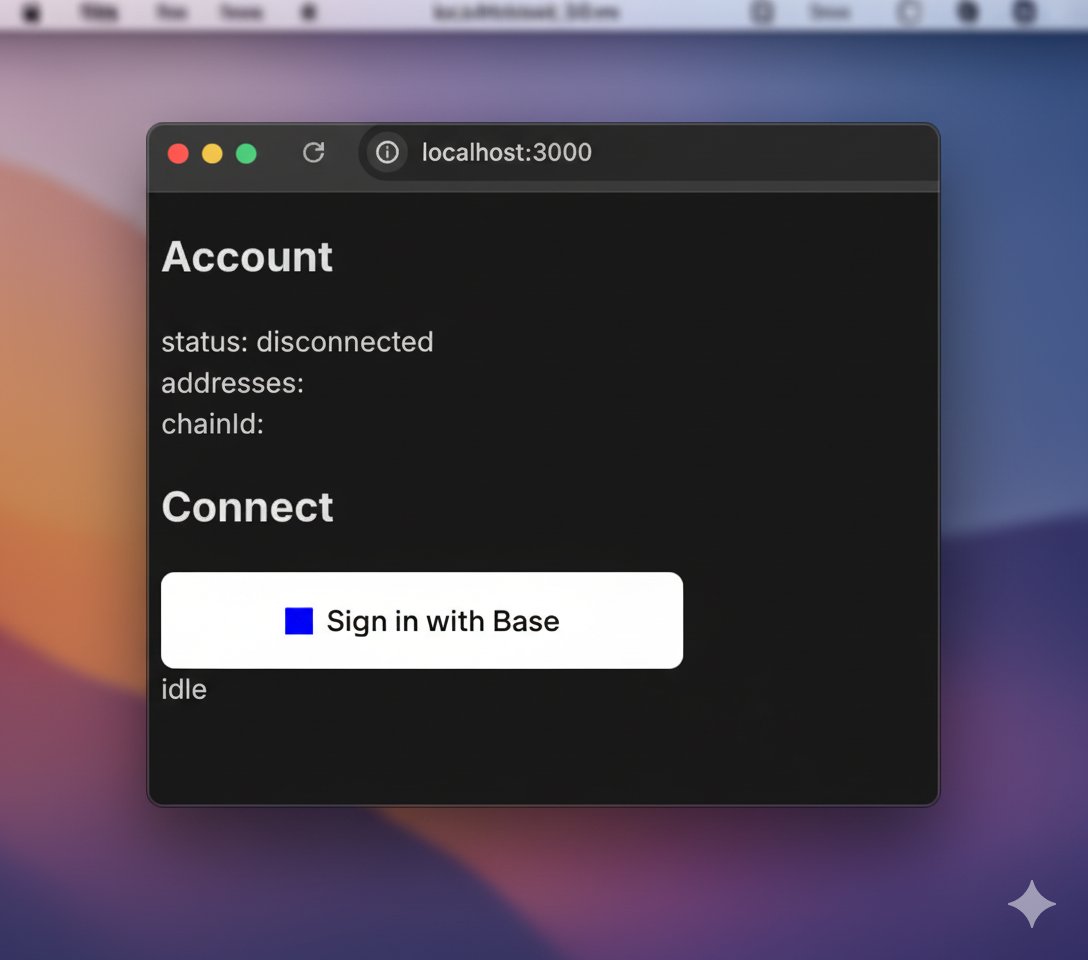
<div style={{ display: 'flex', justifyContent: 'center'}}>
  <img src="https://mintcdn.com/daehan-base/pXKB1jCfk0doXahz/images/base-account/wagmi-siwb.png?fit=max&auto=format&n=pXKB1jCfk0doXahz&q=85&s=65925729ce7348b79194c0975976e43f" alt="Wagmi 설정" style={{ width: '500px', height: 'auto' }} width="1088" height="960" data-path="images/base-account/wagmi-siwb.png" />
</div>

<div style={{ textAlign: 'center', fontStyle: 'italic', marginBottom: '2rem' }}>
  페이지를 탐색할 때 표시되는 화면
</div>

## 다음 단계

Base Account로 Wagmi를 설정했다면 이제 다음을 할 수 있습니다:

* [Base로 로그인으로 사용자 연결](/base-account/framework-integrations/wagmi/sign-in-with-base)
* [Base Account 프로바이더 접근](/base-account/framework-integrations/wagmi/other-use-cases)