
Documentation Index

Fetch the complete documentation index at: https://daehan-base.mintlify.app/llms.txt

Use this file to discover all available pages before exploring further.

Base Pay를 사용하는 이유

Base의 USDC는 몇 초 만에 정산되고 가스 비용이 매우 저렴한 완전 지원 디지털 달러입니다. Base Pay를 사용하면 단 한 번의 클릭으로 이 달러를 수취할 수 있습니다. 카드, 환전 수수료, 차지백이 없습니다.
  • 모든 사용자가 결제 가능 – 기본적으로 모든 Base Account(스마트 지갑)에서 동작합니다.
  • USDC, 가스 불필요 – 달러로 청구하며 가스 후원은 자동으로 처리됩니다.
  • 빠름 – 대부분의 결제가 Base에서 2초 이내에 확인됩니다.
  • 잔액 보유 어카운트 – 사용자가 Base Account 또는 Coinbase Account의 USDC로 결제합니다.
  • 추가 수수료 없음 – 전액을 수취합니다.
브랜드 가이드라인을 준수해 주세요BasePayButton을 사용하려면 애플리케이션 전반의 일관성을 위해 Base 브랜드 가이드라인을 준수해 주세요.

클라이언트 측 (브라우저 SDK)

인터랙티브 플레이그라운드: 앱에 연동하기 전에 Base Pay SDK Playground에서 pay()getPaymentStatus() 함수를 직접 실험해보세요.
Browser (SDK)

import { pay, getPaymentStatus } from '@base-org/account';

// Trigger a payment – user will see a popup from their wallet service
try {
  const payment = await pay({
    amount: '1.00',           // USD amount (USDC used internally)
    to:    '0xRecipient',     // your address
    testnet: true            // set false for Mainnet
  });
  
  // Option 1: Poll until mined
  const { status } = await getPaymentStatus({ 
    id: payment.id,
    testnet: true            // MUST match the testnet setting used in pay()
  });
  if (status === 'completed') console.log('🎉 payment settled');
  
} catch (error) {
  console.error(`Payment failed: ${error.message}`);
}
중요: getPaymentStatus()testnet 파라미터는 원래 pay() 호출에서 사용한 값과 일치해야 합니다. testnet: true로 테스트넷에서 결제를 시작했다면, 상태 확인 시에도 testnet: true를 전달해야 합니다.
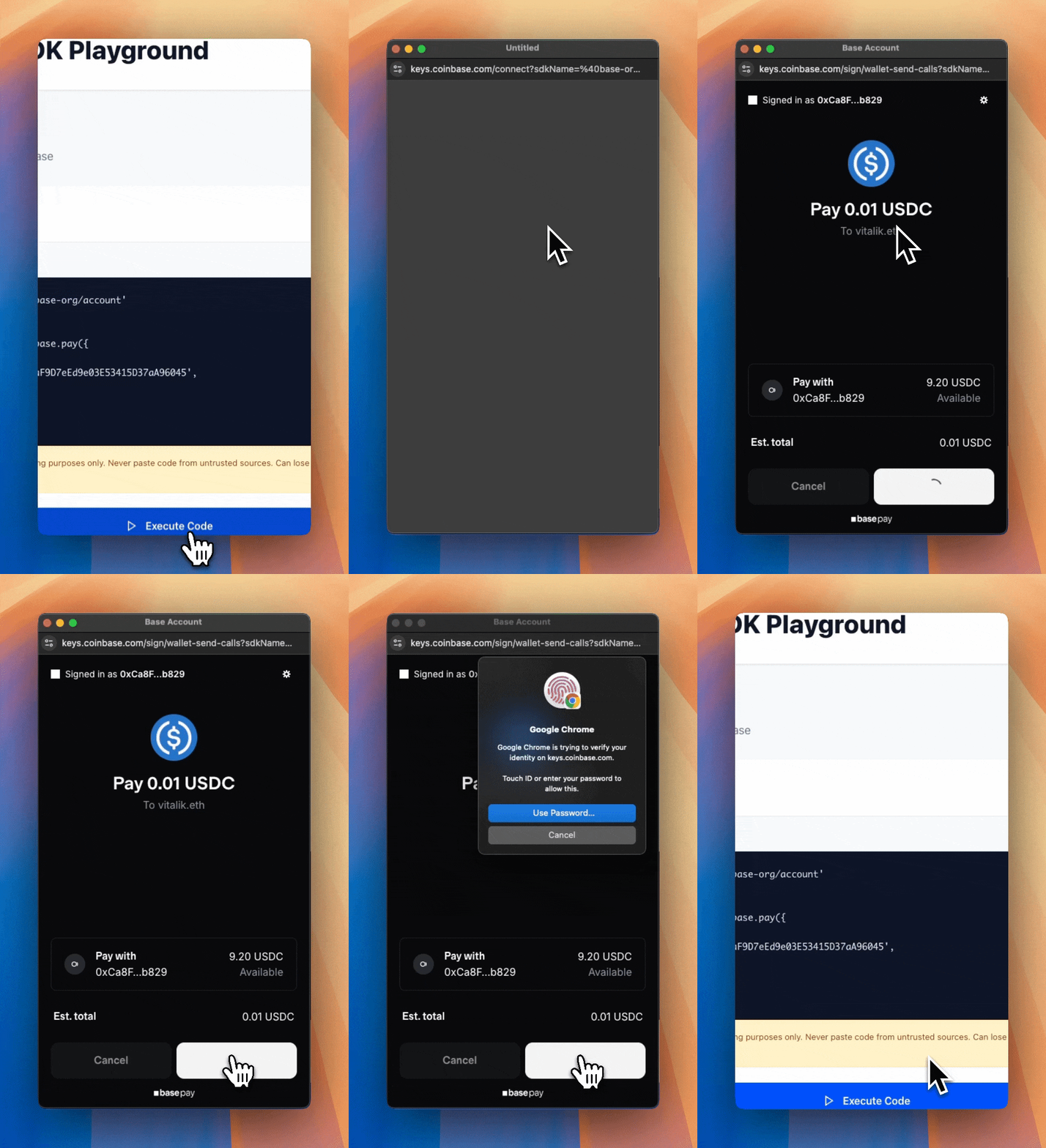
사용자가 결제 요청을 받으면 다음과 같이 표시됩니다:
Pay Popup

사용자 정보 수집 (선택 사항)

결제 시 이메일, 전화번호, 배송 주소가 필요한가요? payerInfo 객체를 전달하세요:
try {
  const payment = await pay({
    amount: '25.00',
    to: '0xRecipient',
    payerInfo: {
      requests: [
        { type: 'email' },
        { type: 'phoneNumber', optional: true },
        { type: 'physicalAddress', optional: true }
      ],
      callbackURL: 'https://your-api.com/validate' // Optional - for server-side validation
    }
  });
  
  console.log(`Payment sent! Transaction ID: ${payment.id}`);
  
  // Log the collected user information
  if (payment.payerInfoResponses) {
    if (payment.payerInfoResponses.email) {
      console.log(`Email: ${payment.payerInfoResponses.email}`);
    }
    if (payment.payerInfoResponses.phoneNumber) {
      console.log(`Phone: ${payment.payerInfoResponses.phoneNumber.number}`);
      console.log(`Country: ${payment.payerInfoResponses.phoneNumber.country}`);
    }
    if (payment.payerInfoResponses.physicalAddress) {
      const address = payment.payerInfoResponses.physicalAddress;
      console.log(`Shipping Address: ${address.name.firstName} ${address.name.familyName}, ${address.address1}, ${address.city}, ${address.state} ${address.postalCode}`);
    }
  }
} catch (error) {
  console.error(`Payment failed: ${error.message}`);
}
지원되는 요청 타입:
type반환값
emailstring
name{ firstName, familyName }
phoneNumber{ number, country }
physicalAddress이름, 주소, 도시, 주/도, 우편번호, 국가가 포함된 전체 주소 객체
onchainAddressstring
기본적으로 필수 항목입니다 — 사용자가 거부할 경우 결제가 중단되지 않으려면 optional: true로 설정하세요.
사용자 정보를 검증하는 방법은?callbackURL을 사용하여 서버 측에서 사용자 정보를 검증할 수 있습니다.callbackURL은 위 예시처럼 결제 완료 후 수집된 정보를 서버에서 검증하는 엔드포인트로 구현하면 됩니다.

서버 측

결제를 수락할 때 백엔드에서는 프론트엔드로부터 받은 트랜잭션과 사용자 정보를 검증해야 합니다. 이 섹션에서는 두 가지 중요한 측면을 다룹니다: 트랜잭션 완료 검증과 사용자 정보 유효성 검사.

사용자 트랜잭션 검증

주문을 이행하기 전에 getPaymentStatus()를 백엔드에서 사용하여 결제가 완료되었는지 확인하세요. 프론트엔드의 결제 확인만 믿지 마세요.
Backend (SDK)
import { getPaymentStatus } from '@base-org/account';

export async function checkPayment(txId: string, testnet = false) {
  const status = await getPaymentStatus({ 
    id: txId,
    testnet  // Must match the testnet setting from the original pay() call
  });
  if (status.status === 'completed') {
    // fulfill order
  }
}
재생 공격 및 사칭 공격 방지
  • 재생 공격: 악의적인 사용자가 동일한 유효한 트랜잭션 ID를 여러 번 제출할 수 있습니다. 항상 데이터베이스에서 처리된 트랜잭션 ID를 추적하세요.
  • 사칭 공격: 악의적인 사용자가 자신의 주문을 이행하기 위해 다른 사람의 트랜잭션 ID를 제출할 수 있습니다. 항상 결제 발신자가 인증된 사용자와 일치하는지 확인하세요.
두 가지 공격 벡터를 모두 방지하는 예시:
Backend (with replay protection)
import { getPaymentStatus } from '@base-org/account';

// Example using a database to track processed transactions
// Replace with your actual database implementation (PostgreSQL, MongoDB, etc.)
const processedTransactions = new Map<string, { 
  orderId: string; 
  sender: string; 
  amount: string;
  timestamp: Date;
}>(); // In production, use a persistent database

export async function verifyAndFulfillPayment(
  txId: string, 
  orderId: string,
  payerAddress: string, // From authenticated user (SIWE, JWT, etc.)
  testnet = false
) {
  // 1. Check if this transaction was already processed
  if (processedTransactions.has(txId)) {
    throw new Error('Transaction already processed');
  }

  // 2. Verify the payment status on-chain
  const { status, sender, amount, recipient } = await getPaymentStatus({ 
    id: txId,
    testnet
  });

  if (status !== 'completed') {
    throw new Error(`Payment not completed. Status: ${status}`);
  }

  // 3. Verify the payment sender matches the authenticated user
  // This prevents a malicious user from claiming someone else's payment
  if (sender.toLowerCase() !== payerAddress.toLowerCase()) {
    throw new Error('Payment sender does not match authenticated user');
  }

  // 4. Validate the payment details match your order
  // This ensures the user paid the correct amount to the correct address
  const expectedAmount = await getOrderAmount(orderId);
  const expectedRecipient = process.env.PAYMENT_ADDRESS;
  
  if (amount !== expectedAmount) {
    throw new Error('Payment amount mismatch');
  }
  
  if (recipient.toLowerCase() !== expectedRecipient.toLowerCase()) {
    throw new Error('Payment recipient mismatch');
  }

  // 5. Mark transaction as processed BEFORE fulfilling
  // Store sender for easy lookup (e.g., to query all payments from a user)
  // In production, use a database transaction to ensure atomicity
  processedTransactions.set(txId, {
    orderId,
    sender,
    amount,
    timestamp: new Date()
  });
  
  // 6. Fulfill the order
  await fulfillOrder(orderId);
  
  return { success: true, orderId, sender };
}
트랜잭션 추적을 위한 데이터베이스 권장 사항:
  • 트랜잭션 ID, 주문 ID, 발신자 주소, 금액, 타임스탬프, 이행 상태를 저장하세요
  • 중복 방지를 위해 트랜잭션 ID에 고유 제약 조건을 사용하세요
  • 빠른 조회를 위해 트랜잭션 ID에 인덱스 추가를 고려하세요

사용자 정보 검증

결제 시 사용자 정보(이메일, 전화번호, 배송 주소)를 수집하는 경우, callbackURL 파라미터를 사용하여 트랜잭션 제출 전에 서버 측에서 이 데이터를 검증하세요. 콜백 엔드포인트는 사용자 정보를 받아 성공 또는 오류 응답으로 응답해야 합니다:
Backend (validation endpoint)
export async function POST(request: Request) {
  const requestData = await request.json();
  const { requestedInfo } = requestData.capabilities.dataCallback;
  const errors: Record<string, string> = {};

  // Validate email
  if (requestedInfo.email) {
    const blockedDomains = ['tempmail.com', 'throwaway.com'];
    const domain = requestedInfo.email.split('@')[1];
    if (blockedDomains.includes(domain)) {
      errors.email = 'Please use a valid email address';
    }
  }

  // Validate shipping address
  if (requestedInfo.physicalAddress) {
    const addr = requestedInfo.physicalAddress;
    const supportedCountries = ['US', 'CA', 'GB'];
    if (!supportedCountries.includes(addr.countryCode)) {
      errors.physicalAddress = { 
        countryCode: 'We currently only ship to US, Canada, and UK' 
      };
    }
  }

  // Return errors if validation failed
  if (Object.keys(errors).length > 0) {
    return Response.json({ errors });
  }

  // Success - return the request to proceed with the transaction
  return Response.json({ request: requestData });
}
콜백은 트랜잭션 제출 전에 호출됩니다. 오류를 반환하면 사용자에게 정보를 수정하라는 메시지가 표시됩니다. 성공을 반환하면 트랜잭션이 진행됩니다.
콜백 요청/응답 형식과 지원되는 데이터 타입은 이 페이지의 예시 payload와 표를 기준으로 구현하세요.

Base Pay 버튼 추가

네이티브 룩앤필을 위해 사전 제작된 컴포넌트를 사용하세요:
Checkout.tsx
import { BasePayButton } from '@base-org/account-ui/react';
import { pay } from '@base-org/account';

export function Checkout() {
  const handlePayment = async () => {
    try {
      const payment = await pay({ amount: '5.00', to: '0xRecipient' });
      console.log(`Payment sent! Transaction ID: ${payment.id}`);
    } catch (error) {
      console.error(`Payment failed: ${error.message}`);
    }
  };

  return (
    <BasePayButton
      colorScheme="light"
      onClick={handlePayment}
    />
  );
}
전체 props 및 테마 옵션은 @base-org/account-ui/react 패키지의 BasePayButton 컴포넌트 타입과 이 페이지의 예시를 참고하세요.
브랜드 가이드라인을 준수해 주세요BasePayButton을 사용하려면 애플리케이션 전반의 일관성을 위해 Base 브랜드 가이드라인을 준수해 주세요.

Base Sepolia 테스트

  1. Circle Faucet에서 테스트 USDC를 받으세요 (“Base Sepolia” 선택).
  2. pay()getPaymentStatus() 호출에 testnet: true를 전달하세요.
  3. Sepolia BaseScan에서 트랜잭션을 확인하세요.