

개요
Wagmi는 EVM(Ethereum Virtual Machine) 호환 네트워크를 위한 React 훅 모음으로, 지갑, 컨트랙트, 트랜잭션, 서명 작업을 쉽게 처리할 수 있게 해줍니다. Base Account는 Wagmi와 완벽하게 통합되어 친숙한 훅을 모두 사용할 수 있습니다. Base Account Wagmi 템플릿으로 바로 시작할 수 있습니다.설치
옵션 1: 새 Wagmi 프로젝트
1
새 Wagmi 프로젝트 생성
명령줄로 새 wagmi 프로젝트를 생성합니다:
npm create wagmi@latest
pnpm create wagmi
yarn create wagmi
bun create wagmi
2
Base Account SDK 버전 오버라이드
Wagmi 내에서 최신 버전의 Base Account SDK에 접근하려면 다음 명령어로 오버라이드합니다:특정 버전을 사용하려면 오버라이드에 버전을 추가하세요:
npm pkg set overrides.@base-org/account="latest"
# 또는 package.json에 수동으로 추가:
# "overrides": { "@base-org/account": "latest" }
# pnpm은 package.json에 수동으로 추가해야 합니다:
# "pnpm": { "overrides": { "@base-org/account": "latest" } }
# yarn은 resolutions를 사용합니다 - package.json에 수동으로 추가:
# "resolutions": { "@base-org/account": "latest" }
# bun은 overrides를 지원합니다 - package.json에 수동으로 추가:
# "overrides": { "@base-org/account": "latest" }
npm pkg set overrides.@base-org/account="2.2.0"
# 또는 package.json에 수동으로 추가:
# "overrides": { "@base-org/account": "2.2.0" }
# pnpm은 package.json에 수동으로 추가해야 합니다:
# "pnpm": { "overrides": { "@base-org/account": "2.2.0" } }
# yarn은 resolutions를 사용합니다 - package.json에 수동으로 추가:
# "resolutions": { "@base-org/account": "2.2.0" }
# bun은 overrides를 지원합니다 - package.json에 수동으로 추가:
# "overrides": { "@base-org/account": "2.2.0" }
3
의존성 설치
원하는 패키지 매니저로 의존성을 설치합니다:
npm install
pnpm install
yarn install
bun install
처음 설치가 아닌 경우오버라이드가 적용되도록
node_modules와 package-lock.json을 삭제하고 새로 설치해야 합니다.옵션 2: 기존 프로젝트
1
Base Account SDK 버전 오버라이드
Wagmi 내에서 최신 버전의 Base Account SDK에 접근하려면 다음 명령어로 오버라이드합니다:특정 버전을 사용하려면 오버라이드에 버전을 추가하세요:
npm pkg set overrides.@base-org/account="latest"
# 또는 package.json에 수동으로 추가:
# "overrides": { "@base-org/account": "latest" }
# pnpm은 package.json에 수동으로 추가해야 합니다:
# "pnpm": { "overrides": { "@base-org/account": "latest" } }
# yarn은 resolutions를 사용합니다 - package.json에 수동으로 추가:
# "resolutions": { "@base-org/account": "latest" }
# bun은 overrides를 지원합니다 - package.json에 수동으로 추가:
# "overrides": { "@base-org/account": "latest" }
npm pkg set overrides.@base-org/account="2.2.0"
# 또는 package.json에 수동으로 추가:
# "overrides": { "@base-org/account": "2.2.0" }
# pnpm은 package.json에 수동으로 추가해야 합니다:
# "pnpm": { "overrides": { "@base-org/account": "2.2.0" } }
# yarn은 resolutions를 사용합니다 - package.json에 수동으로 추가:
# "resolutions": { "@base-org/account": "2.2.0" }
# bun은 overrides를 지원합니다 - package.json에 수동으로 추가:
# "overrides": { "@base-org/account": "2.2.0" }
2
의존성 설치
원하는 패키지 매니저로 의존성을 설치합니다:
npm install viem wagmi @tanstack/react-query
pnpm add viem wagmi @tanstack/react-query
yarn add viem wagmi @tanstack/react-query
bun add viem wagmi @tanstack/react-query
처음 설치가 아닌 경우오버라이드가 적용되도록
node_modules와 package-lock.json을 삭제하고 새로 설치해야 합니다.설정
1. Base Account로 Wagmi 설정
Base Account 커넥터가 설정된 Wagmi 설정을 생성합니다:app/wagmi.ts
import { cookieStorage, createConfig, createStorage, http } from "wagmi";
import { base, baseSepolia } from "wagmi/chains";
import { baseAccount } from "wagmi/connectors";

export function getConfig() {
  return createConfig({
    chains: [base, baseSepolia],
    multiInjectedProviderDiscovery: false,
    connectors: [
      baseAccount({
        appName: "My Wagmi App",
      }),
    ],
    storage: createStorage({
      storage: cookieStorage,
    }),
    ssr: true,
    transports: {
      [base.id]: http(),
      [baseSepolia.id]: http(),
    },
  });
}

declare module "wagmi" {
  interface Register {
    config: ReturnType<typeof getConfig>;
  }
}
2. 앱 래핑
Wagmi 프로바이더와 QueryClient 프로바이더로 애플리케이션을 래핑합니다:'use client'
import { QueryClient, QueryClientProvider } from '@tanstack/react-query'
import { type ReactNode, useState } from 'react'
import { type State, WagmiProvider } from 'wagmi'
import { getConfig } from '@/wagmi'
export function Providers(props: {
children: ReactNode
initialState?: State
}) {
const [config] = useState(() => getConfig())
const [queryClient] = useState(() => new QueryClient())
return (
<WagmiProvider config={config} initialState={props.initialState}>
<QueryClientProvider client={queryClient}>
{props.children}
</QueryClientProvider>
</WagmiProvider>
)
}
'use client'

import { QueryClient, QueryClientProvider } from '@tanstack/react-query'
import { type ReactNode, useState } from 'react'
import { type State, WagmiProvider } from 'wagmi'

import { getConfig } from '@/wagmi'

export function Providers(props: {
  children: ReactNode
  initialState?: State
}) {
  const [config] = useState(() => getConfig())
  const [queryClient] = useState(() => new QueryClient())

  return (
    <WagmiProvider config={config} initialState={props.initialState}>
      <QueryClientProvider client={queryClient}>
        {props.children}
      </QueryClientProvider>
    </WagmiProvider>
  )
}
간단한 페이지 생성 (Base로 로그인)
Base로 로그인을 사용하여 사용자를 인증하는 간단한 랜딩 페이지를 생성합니다"use client";
import { Connector } from "wagmi";
import { SignInWithBaseButton } from "@base-org/account-ui/react";
import { useState } from "react";
interface SignInWithBaseProps {
connector: Connector;
}
export function SignInWithBase({ connector }: SignInWithBaseProps) {
const [verificationResult, setVerificationResult] = useState<string>("");
async function handleBaseAccountConnect() {
const provider = await connector.getProvider();
if (provider) {
try {
// 새로운 nonce 생성 (백엔드 nonce로 덮어씌워질 예정)
const clientNonce =
Math.random().toString(36).substring(2, 15) +
Math.random().toString(36).substring(2, 15);
console.log("clientNonce", clientNonce);
// 서명, 메시지, 주소를 가져오기 위해 SIWE로 연결
const accounts = await (provider as any).request({
method: "wallet_connect",
params: [
{
version: "1",
capabilities: {
signInWithEthereum: {
nonce: clientNonce,
chainId: "0x2105", // Base 메인넷 - 8453
},
},
},
],
});
// 백엔드에서 서명 검증
/*
const walletAddress = accounts.accounts[0].address;
const signature =
accounts.accounts[0].capabilities.signInWithEthereum.signature;
const message =
accounts.accounts[0].capabilities.signInWithEthereum.message;
const verifyResponse = await fetch("/api/auth/verify", {
method: "POST",
headers: { "Content-Type": "application/json" },
body: JSON.stringify({
address: walletAddress,
message,
signature,
}),
});
const result = await verifyResponse.json();
*/
const result={success:true, address:accounts[0].address} // 목업 응답
if (result.success) {
setVerificationResult(`검증 완료! 주소: ${result.address}`);
} else {
setVerificationResult(`검증 실패: ${result.error}`);
}
} catch (err) {
console.error("Error:", err);
setVerificationResult(
`오류: ${err instanceof Error ? err.message : "알 수 없는 오류"}`
);
}
} else {
console.error("No provider");
}
}
return (
<div>
<div style={{ width: "300px" }}>
<SignInWithBaseButton
onClick={handleBaseAccountConnect}
variant="solid"
colorScheme="system"
align="center"
/>
</div>
{verificationResult && (
<div style={{ marginTop: "10px" }}>{verificationResult}</div>
)}
</div>
);
}
"use client";

import { useAccount, useConnect, useDisconnect } from "wagmi";
import { SignInWithBase } from "../components/SignInWithBase";

function App() {
  const account = useAccount();
  const { connectors, connect, status, error } = useConnect();
  const { disconnect } = useDisconnect();

  return (
    <>
      <div>
        <h2>계정</h2>

        <div>
          상태: {account.status}
          <br />
          주소: {JSON.stringify(account.addresses)}
          <br />
          체인 ID: {account.chainId}
        </div>

        {account.status === "connected" && (
          <button type="button" onClick={() => disconnect()}>
            연결 해제
          </button>
        )}
      </div>

      <div>
        <h2>연결</h2>
        {connectors.map((connector) => {
          if (connector.name === "Base Account") {
            return (
              <SignInWithBase key={connector.uid} connector={connector} />
            );
          } else {
            return (
              <button
                key={connector.uid}
                onClick={() => connect({ connector })}
                type="button"
              >
                {connector.name}
              </button>
            );
          }
        })}
        <div>{status}</div>
        <div>{error?.message}</div>
      </div>
    </>
  );
}

export default App;
이것은 시작을 위한 간단한 예제입니다.
서명을 검증하고 사용자를 인증하기 위한 백엔드 로직을 추가해야 합니다.완전한 예제는 Base Account Wagmi 템플릿에서 확인할 수 있습니다.
Wagmi 앱 실행
원하는 패키지 매니저로 애플리케이션을 실행합니다:npm run dev
pnpm run dev
yarn run dev
bun run dev
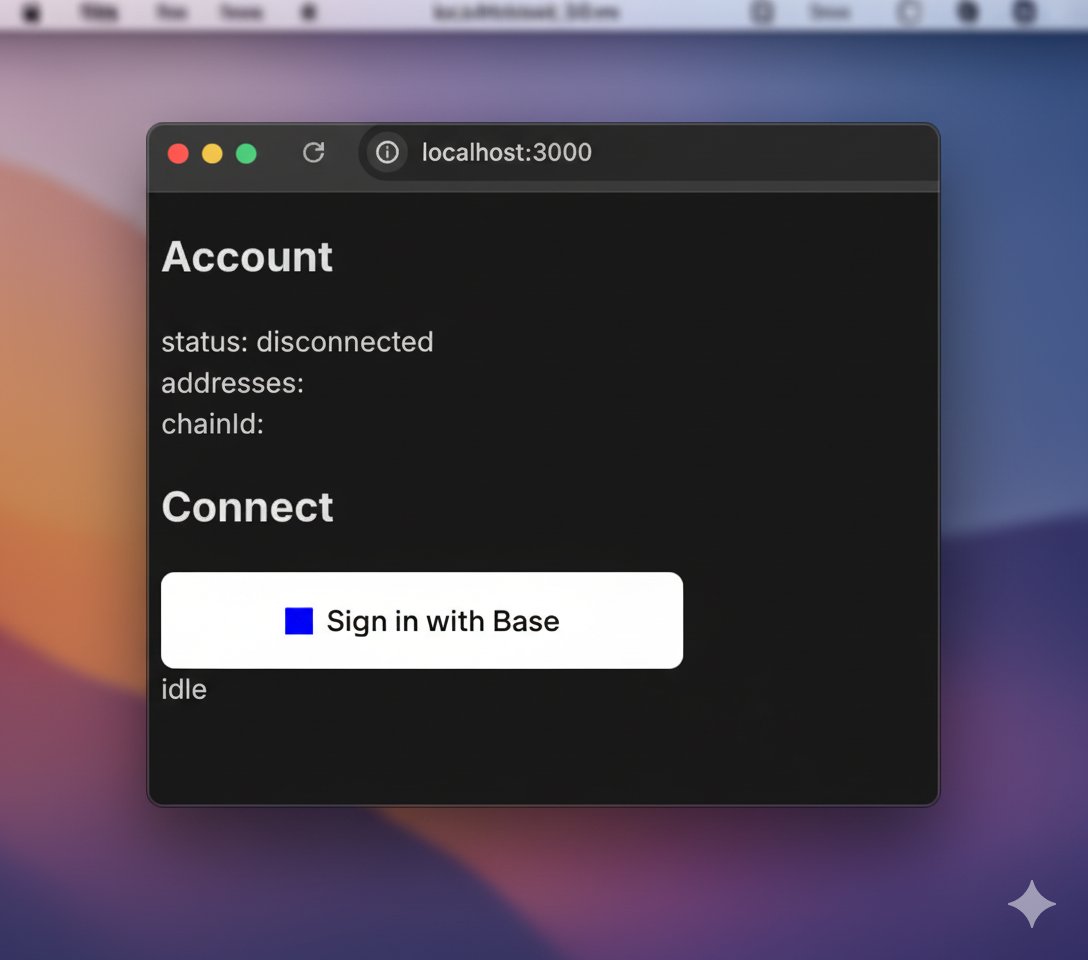
페이지를 탐색할 때 표시되는 화면