

개요
Privy는 초기 인증 플로우를 처리하며 사용자 세션과 지갑 연결을 관리합니다. 보안 강화나 커스텀 요구사항을 위해 추가적인 인증 레이어를 구현할 수도 있습니다. 이 가이드의 코드 스니펫은 다음 예제 프로젝트를 기반으로 합니다:인증 플로우
Privy는 사용자가 애플리케이션에 진입하기 전에 기본 인증을 관리합니다: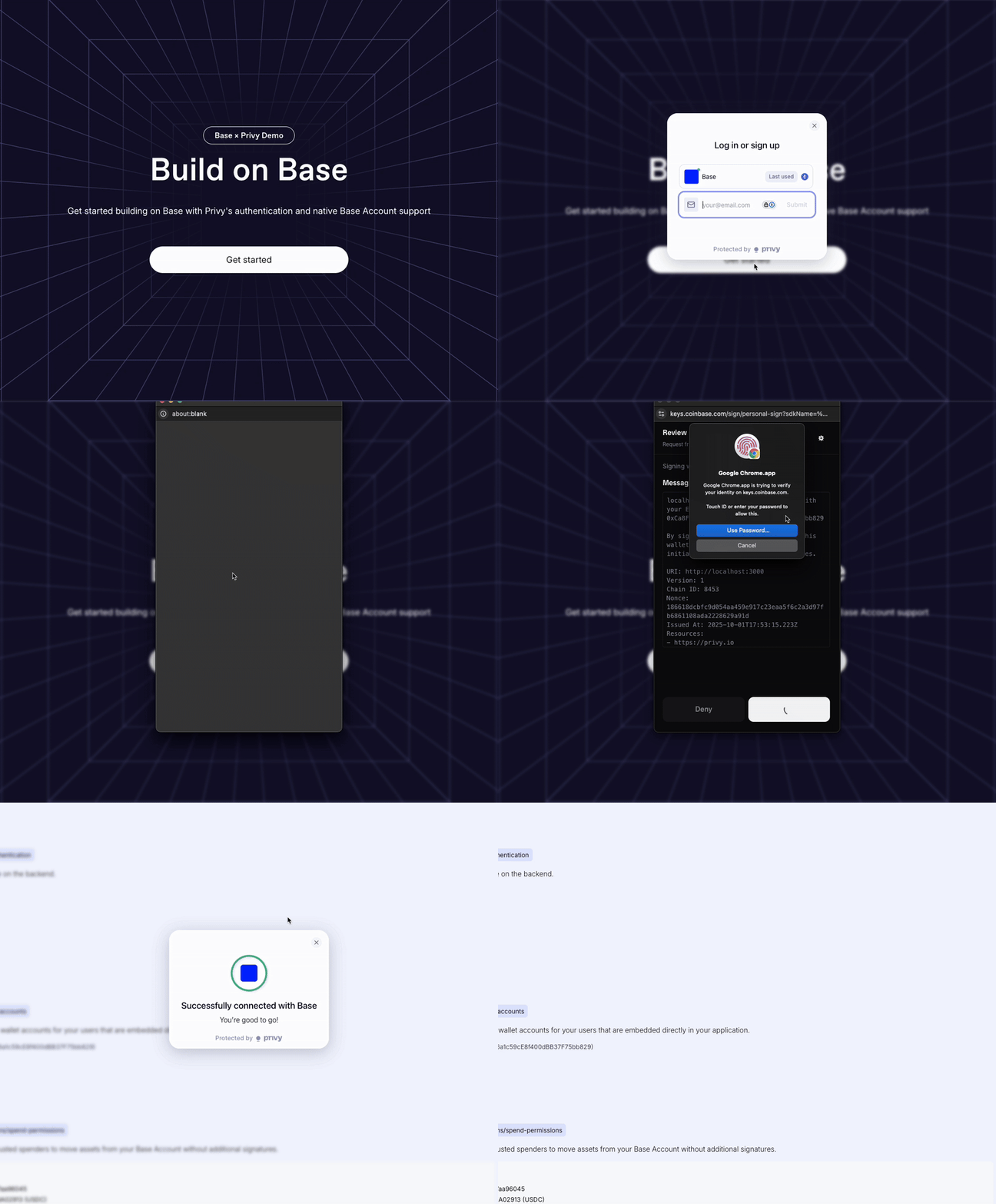
커스텀 인증
추가적인 보안이나 커스텀 인증 요구사항을 위해 Base Account SDK를 사용한 Sign-In with Ethereum (SIWE)으로 백엔드 검증을 구현할 수 있습니다.설정
설정 가이드를 따라 Base Account와 함께 Privy를 설정하세요.프런트엔드 컴포넌트 (Base로 로그인)
브랜드 가이드라인을 준수하기 위해@base-org/account-ui/react 패키지의 SignInWithBaseButton 컴포넌트를 사용합니다.
"use client";

import { useState } from "react";
import { useBaseAccountSdk } from "@privy-io/react-auth";
import { SignInWithBaseButton } from "@base-org/account-ui/react";

export const Authentication = () => {
  const { baseAccountSdk } = useBaseAccountSdk();
  const [loading, setLoading] = useState(false);
  const [verificationResult, setVerificationResult] = useState<any>(null);

  const provider = baseAccountSdk?.getProvider();

  const handleSignInWithBase = async () => {
    if (!provider) return;

    try {
      setLoading(true);

      // 백엔드에서 새로운 nonce 가져오기
      const nonceResponse = await fetch("/api/auth/nonce");
      const { nonce } = await nonceResponse.json();

      // Base Chain으로 전환
      await provider.request({
        method: "wallet_switchEthereumChain",
        params: [{ chainId: "0x2105" }],
      });

      // SIWE로 연결 및 인증
      const response = (await provider.request({
        method: "wallet_connect",
        params: [{
          version: "1",
          capabilities: {
            signInWithEthereum: {
              nonce,
              chainId: "0x2105",
            },
          },
        }],
      })) as {
        accounts: {
          address: string;
          capabilities: {
            signInWithEthereum: { signature: string; message: string };
          };
        }[];
      };

      const { address } = response.accounts[0];
      const { message, signature } = response.accounts[0].capabilities.signInWithEthereum;

      // 백엔드에서 검증
      const verifyResponse = await fetch("/api/auth/verify", {
        method: "POST",
        headers: { "Content-Type": "application/json" },
        body: JSON.stringify({ address, message, signature }),
      });

      const result = await verifyResponse.json();
      setVerificationResult(result);
    } catch (error) {
      console.error("Sign in error:", error);
    } finally {
      setLoading(false);
    }
  };

  return (
    <div>
      <SignInWithBaseButton onClick={handleSignInWithBase} />
      {verificationResult && (
        <div>✅ 백엔드 검증 완료! 주소: {verificationResult.address}</div>
      )}
    </div>
  );
};

export default Authentication;
인증 컴포넌트 사용
Base로 로그인 기능을 활성화하기 위해 페이지에 Authentication 컴포넌트를 추가합니다:import Authentication from "@/components/sections/authentication";
export default function Home() {
return (
<main className="flex min-h-screen flex-col items-center justify-center p-24">
<div className="z-10 w-full max-w-5xl items-center justify-between font-mono text-sm">
<h1 className="text-4xl font-bold text-center mb-8">
Privy와 함께하는 Base Account
</h1>
<div className="flex flex-col items-center space-y-4">
<Authentication />
</div>
</div>
</main>
);
}
"use client";

import { usePrivy } from "@privy-io/react-auth";
import Authentication from "@/components/sections/authentication";

export default function Dashboard() {
  const { authenticated } = usePrivy();

  if (!authenticated) {
    return (
      <div className="flex min-h-screen items-center justify-center">
        <div className="text-center">
          <h1 className="text-2xl font-bold mb-4">접근 권한 필요</h1>
          <p className="mb-6">대시보드에 접근하려면 인증하세요.</p>
          <Authentication />
        </div>
      </div>
    );
  }

  return (
    <div className="min-h-screen p-8">
      <h1 className="text-3xl font-bold mb-6">대시보드</h1>
      <p>인증된 대시보드에 오신 것을 환영합니다!</p>
      {/* 보호된 콘텐츠 */}
    </div>
  );
}
백엔드 구현
개발 전용: 이 백엔드 구현은 프로덕션 준비가 되어 있지 않습니다. nonce 관리 시스템은 프로덕션 사용을 위해 적절한 지속성과 보안 강화가 필요합니다.
import { NextResponse } from 'next/server';
import crypto from 'crypto';
import { nonceStore } from '@/lib/nonce-store';

export async function GET() {
  try {
    const nonce = crypto.randomBytes(16).toString('hex');
    nonceStore.add(nonce);

    return NextResponse.json({ nonce });
  } catch (error) {
    return NextResponse.json(
      { error: '서명 생성 실패' },
      { status: 500 }
    );
  }
}
import { NextRequest, NextResponse } from 'next/server';
import { createPublicClient, http } from 'viem';
import { base } from 'viem/chains';
import { nonceStore } from '@/lib/nonce-store';

const client = createPublicClient({
  chain: base,
  transport: http()
});

export async function POST(request: NextRequest) {
  try {
    const { address, message, signature } = await request.json();

    // SIWE 메시지에서 nonce 추출
    const nonce = message.match(/Nonce: (\w+)/)?.[1];

    if (!nonce || !nonceStore.consume(nonce)) {
      return NextResponse.json(
        { error: '유효하지 않거나 이미 사용된 nonce' },
        { status: 400 }
      );
    }

    // viem을 사용한 서명 검증
    const valid = await client.verifyMessage({
      address: address as `0x${string}`,
      message,
      signature: signature as `0x${string}`
    });

    if (!valid) {
      return NextResponse.json(
        { error: '유효하지 않은 서명' },
        { status: 401 }
      );
    }

    return NextResponse.json({
      success: true,
      address,
      timestamp: new Date().toISOString()
    });

  } catch (error) {
    return NextResponse.json(
      { error: '내부 서버 오류' },
      { status: 500 }
    );
  }
}
// 간단한 인메모리 nonce 저장소
// 프로덕션에서는 Redis 또는 데이터베이스 사용
class NonceStore {
  private nonces = new Set<string>();

  add(nonce: string): void {
    this.nonces.add(nonce);
  }

  consume(nonce: string): boolean {
    return this.nonces.delete(nonce);
  }
}

export const nonceStore = new NonceStore();
프로덕션 고려사항
프로덕션 배포를 위해 다음 백엔드 구현 강화를 권장합니다:- 영속 저장소: 인메모리 저장소 대신 Redis 또는 데이터베이스 사용
- 속도 제한: nonce 생성에 대한 요청 속도 제한 구현
- 세션 관리: 적절한 JWT 토큰 또는 세션 쿠키 생성
- Nonce 만료: 타임스탬프 기반 nonce 만료 추가