Documentation Index
Fetch the complete documentation index at: https://daehan-base.mintlify.app/llms.txt
Use this file to discover all available pages before exploring further.
원활한 사용자 인증과 지갑 관리를 위해 Base Account와 함께 Privy를 설정하는 방법을 알아보세요.
Privy는 온체인 애플리케이션을 위한 사용자 인증 및 지갑 관리 솔루션을 제공합니다.
Base Account와 Privy를 통합하면 Base Account 사용자에 대한 접근을 유지하면서 모든 Privy 훅과 메서드를 사용할 수 있습니다.
달성할 내용
이 가이드를 마치면 다음을 할 수 있습니다:
- Base Account 지원으로 Privy 설정
- Base Account를 주요 인증 옵션으로 설정
- Privy의 React SDK에서 Base Account SDK에 접근
Base Account Privy 템플릿으로 바로 시작할 수 있습니다.
1. 새 Next.js 프로젝트 생성
npx create-next-app@latest base-account-privy
cd base-account-privy
2. Base Account SDK 버전 오버라이드
최신 버전의 Base Account SDK에 접근하려면 package.json 파일에서 Privy가 고정한 버전을 오버라이드해야 합니다.
다음 명령어로 오버라이드할 수 있습니다:
npm pkg set overrides.@base-org/account="latest"
# 또는 package.json에 수동으로 추가:
# "overrides": { "@base-org/account": "latest" }
특정 버전을 사용하려면 오버라이드에 버전을 추가하세요:
npm pkg set overrides.@base-org/account="2.2.0"
# 또는 package.json에 수동으로 추가:
# "overrides": { "@base-org/account": "2.2.0" }
새 프로젝트가 아닌 경우오버라이드가 적용되도록 node_modules와 package-lock.json을 삭제하고 새로 설치해야 합니다.
3. 의존성 설치
원하는 패키지 매니저로 의존성을 설치합니다:
npm install @privy-io/react-auth @privy-io/chains @privy-io/wagmi-connector wagmi viem @base-org/account-ui react-toastify
1. 환경 변수 설정
프로젝트 루트에 .env.local 파일을 생성합니다:
NEXT_PUBLIC_PRIVY_APP_ID=your_privy_app_id
Privy App ID는 Privy 대시보드에서 가져옵니다.
2. Privy 프로바이더 설정
Base Account를 기본 로그인 방법으로 하는 Privy 설정을 생성하고, PrivyProvider를 포함하도록 레이아웃을 업데이트합니다.
"use client";
import { PrivyProvider } from "@privy-io/react-auth";
import { base } from "@privy-io/chains";
export default function Providers({ children }: { children: React.ReactNode }) {
return (
<PrivyProvider
appId={process.env.NEXT_PUBLIC_PRIVY_APP_ID!}
config={{
appearance: {
walletList: ['base_account'],
showWalletLoginFirst: true
},
defaultChain: base,
}}
>
{children}
</PrivyProvider>
);
}
사용법
1. 앱 페이지 업데이트
인증 플로우를 표시하도록 app/page.tsx 파일을 업데이트합니다:
"use client";
import { usePrivy } from "@privy-io/react-auth";
import { ToastContainer } from "react-toastify";
function Home() {
const { ready, authenticated, logout, login } = usePrivy();
if (!ready) {
return <div>로딩 중...</div>;
}
return (
<div className="bg-white md:max-h-[100vh] md:overflow-hidden">
{authenticated ? (
<section className="w-full flex flex-col md:flex-row md:h-[calc(100vh-60px)]">
<div className="flex-grow overflow-y-auto h-full p-4 pl-8">
<button className="button" onClick={logout}>로그아웃</button>
</div>
</section>
) : (
<section className="w-full flex flex-row justify-center items-center h-[calc(100vh-60px)] relative bg-gradient-to-b from-blue-600 to-blue-700">
<div className="z-10 flex flex-col items-center justify-center w-full h-full px-4">
<div className="flex h-10 items-center justify-center rounded-[20px] border border-white/20 bg-white/10 backdrop-blur-sm px-6 text-lg text-white font-abc-favorit">
Base × Privy 데모
</div>
<div className="text-center mt-4 text-white text-7xl font-medium font-abc-favorit leading-[81.60px]">
Base 위에서 구축
</div>
<div className="text-center text-white/90 text-xl font-normal leading-loose mt-8 max-w-2xl">
Privy의 인증과 네이티브 Base Account 지원으로 Base 위에서 구축을 시작하세요
</div>
<button
className="bg-white text-black mt-15 w-full max-w-md rounded-full px-4 py-2 font-medium hover:bg-gray-50 transition-colors lg:px-8 lg:py-4 lg:text-xl"
onClick={() => {
login();
setTimeout(() => {
(document.querySelector('input[type="email"]') as HTMLInputElement)?.focus();
}, 150);
}}
>
시작하기
</button>
</div>
</section>
)}
<ToastContainer
position="top-center"
autoClose={5000}
hideProgressBar
newestOnTop={false}
closeOnClick={false}
rtl={false}
pauseOnFocusLoss
draggable={false}
pauseOnHover
limit={1}
aria-label="Toast notifications"
style={{ top: 58 }}
/>
</div>
);
}
export default Home;
2. 로컬에서 프로젝트 실행
완료되었습니다! 이제 로컬에서 프로젝트를 실행할 수 있습니다:
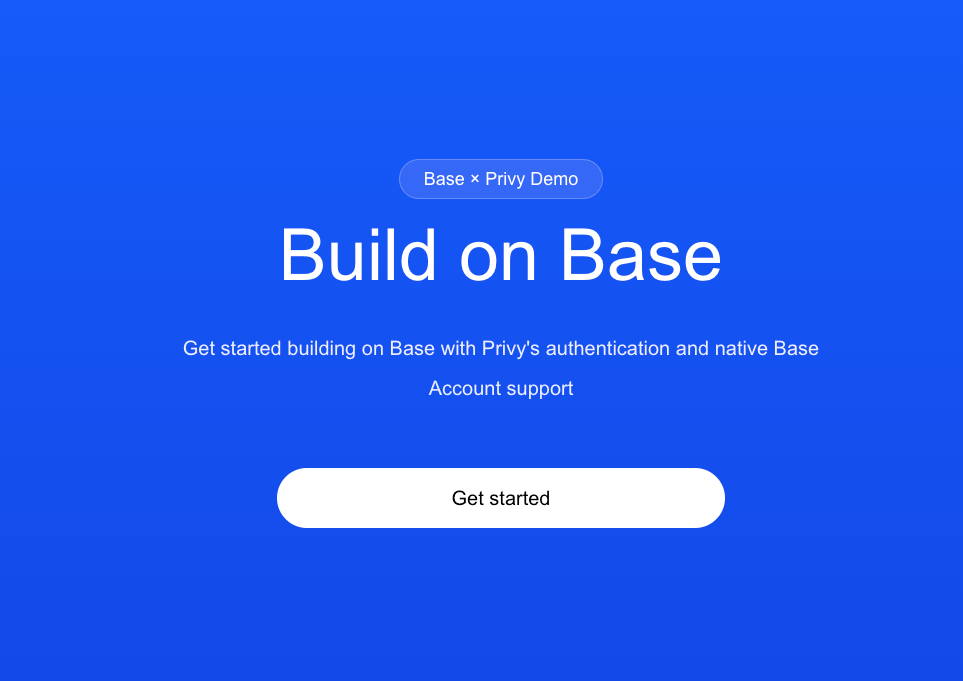
다음과 같은 페이지가 표시됩니다:
3. Base Account SDK 인스턴스 가져오기 (선택사항)
useBaseAccount 훅을 사용하여 Privy에서 Base Account SDK에 접근할 수 있습니다.
import { useBaseAccountSdk } from '@privy-io/react-auth';
const { baseAccountSdk } = useBaseAccountSdk();
const provider = baseAccountSdk.getProvider();
const addresses = await provider.request({method: 'wallet_connect'});